
Choose from 3 Plans!
The first month is only 99 yen! Enjoy at a great value!

① Read Weekly SPA! in the Viewer
You can read Weekly SPA! one day before the release! Unlimited reading from the July 31, 2021 issue to the latest issue! ⇒Check out Weekly SPA!
② Unlimited Gravure Photos
Full of popular gravure idols such as Tomi and Shinonome Umi! Every month, you can see 100 newly shot pictures of the monthly featured talent "Monthly Girls". ⇒Check out the Gravure List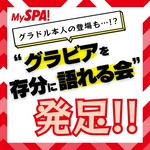
③ Join the Gravure Community
The exclusive LINE community chat "SPA! Gravure Talk Group" for MySPA! members has started! By joining, you can enjoy off-shots from the shoots, behind the scenes, and gravure talk! ⇒Check the Details
④ Unlimited Access to MySPA! Original Content
Read exclusive articles available only on MySPA! without any limit for paid members! ⇒Check Out New Articles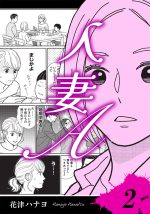
⑤ Unlimited Manga Reading
You can also enjoy SPA! original serialized manga "Wife A" and other popular manga such as "Solitary Gourmet", "AV Actress Chan", "Gomanism Declaration", etc., as much as you want! ⇒Check Out Manga List※ Free&Paid members please login and then purchase a plan.
Get the first month for
just 99 yen!
Usually 990 yen per month (tax included)...
First month only just 99 yen!
99
yen (tax included)
Start the Monthly Plan
⇒ Click here for re-registration!Enjoy 6 Months for the Price of about 5 months with this Great Plan!
※ Free&Paid members please login and then purchase a plan.
Enjoy for Just 800 Yen per Month!
Save 1,140 yen!
Normally, 6 months for 5,940 yen (tax included)...
But only4,800
yen (tax included) for half a year!
Start the 6-Month Plan
Enjoy 1 Year for the Price of about 8 months with this Great Plan!
※ Free&Paid members please login and then purchase a plan.
Enjoy for Just 650 Yen per Month!
Save 4,080 yen!
Normally, 1 year for 11,880 yen (tax included)...
But only7,800
yen (tax included) for one year!
Start the Annual Plan
If you are unsure about a plan, start with a Free Membership!
Free Membership
Enjoy free articles and receive recommended articles in newsletters.
Read secret features handled by the Weekly SPA! The content is plentiful, including erotic contents and profitable side-job features.
Feature "AI Unveiled [How to Love a Woman]"
 Feature "Meeting Spots for Inbound Beauties Frontline"
 Feature "Comprehensive Guide to Legal Sex Drugs"

What is "MySPA!"?
It is a subscription service run by the magazine "Weekly SPA!". By registering as a member and purchasing your desired plan, you get unlimited access to contents associated with that plan.
What payment methods are available?
You can use credit cards (VISA / MASTER / JCB / AMEX / DINERS), carrier payments (d-payment / au simple payment / SoftBank collectively payment).
Q. How do I change my paid plan?
You can easily change the plan on the My Account page.
Select "My Account > Contract Details > Current Plan > Change Plan" to choose another plan.
After changing the plan, the new plan's fee will be charged on the next contract renewal date. Please check the details carefully before changing plans.
Cancellations or refunds after the next contract renewal date are not possible.
Additionally, after changing the plan, you cannot turn off "Auto-Renewal" in My Account until the next contract renewal date. Please do it after the next contract renewal date.
How do I cancel a paid plan?
On Wednesday, September 3, 2025 (daytime), we implemented a plan upgrade in line with a price reduction for paid plans.
Due to this upgrade, you will not be able to cancel (terminate) your subscription via “My Account” until your next renewal date.
We sincerely apologize for the inconvenience. If you wish to cancel (terminate), please contact “MySPA! Member Support.” Our team will process the cancellation on your behalf.
Normally, You can cancel your paid plan by following the steps below. <For PC> Select “My Account > Contract Details > Manage Button > Cancel Subscription”. <For Smartphone> Select “My Account > Contract Details > Settings Button (three vertical dots) > Cancel Subscription”.
Once you perform the above steps, the cancellation will take effect automatically after the current contract period ends. During the contract period, you can continue to view the contents linked to your plan. Please note that no refunds will be made after cancellation.
If you wish to delete your account (withdrawal) after canceling your paid plan, please contact us via the “Member Inquiry Form” (https://nikkan-spa.jp/myspa/k-inquiry/) with the message “Request for Withdrawal,” and we will process your account deletion.
※ If you are unable to cancel your subscription, please contact us via the “Member Inquiry Form” (https://nikkan-spa.jp/myspa/k-inquiry/) with your request for cancellation. Our team will turn off the auto-renewal on your behalf.
※ After changing your plan, you cannot cancel the subscription until the next renewal date. For details, please see “About Changing Plans” at the bottom of this page.
※ For those who applied via Benefit Station / Kyutoku Payment, your subscription will be automatically canceled once the validity period of the plan you applied for through Benefit Station ends. No action is required on your part.
We sincerely apologize for the inconvenience. If you wish to cancel (terminate), please contact “MySPA! Member Support.” Our team will process the cancellation on your behalf.
Normally, You can cancel your paid plan by following the steps below. <For PC> Select “My Account > Contract Details > Manage Button > Cancel Subscription”. <For Smartphone> Select “My Account > Contract Details > Settings Button (three vertical dots) > Cancel Subscription”.
Once you perform the above steps, the cancellation will take effect automatically after the current contract period ends. During the contract period, you can continue to view the contents linked to your plan. Please note that no refunds will be made after cancellation.
If you wish to delete your account (withdrawal) after canceling your paid plan, please contact us via the “Member Inquiry Form” (https://nikkan-spa.jp/myspa/k-inquiry/) with the message “Request for Withdrawal,” and we will process your account deletion.
※ If you are unable to cancel your subscription, please contact us via the “Member Inquiry Form” (https://nikkan-spa.jp/myspa/k-inquiry/) with your request for cancellation. Our team will turn off the auto-renewal on your behalf.
※ After changing your plan, you cannot cancel the subscription until the next renewal date. For details, please see “About Changing Plans” at the bottom of this page.
※ For those who applied via Benefit Station / Kyutoku Payment, your subscription will be automatically canceled once the validity period of the plan you applied for through Benefit Station ends. No action is required on your part.